Wired vs Wireless Networks

Wired vs. Wireless: Which Network Architecture Is Right for You?

For years, the rule of thumb was simple: if you want real speed (or have IP phones), plug it in. If you want convenience, use Wi-Fi. But with the arrival of Wi-Fi 7, Teams Voice, etc – is that still true?

In this post, we weigh up the considerations when deciding between a wired network or a modern Wi-Fi Network.

TLDR: If it’s a new network, opt for Wi-Fi 7

Wired: From Legacy Ports to High-Bandwidth Backbones

The wired network is no longer just “the thing that connects the PC.” It has evolved from a dumb pipe into an intelligent, high-speed foundation.

The Traditional Wired Network

The Standard: 1Gbps was the ceiling for a decade.
Device Profiles: Primarily IP phones and desktop towers/small form factors.
Management: Manual VLAN tagging on a port-by-port basis via a clunky web UI, or an enterprise CLI like Cisco/Juniper – often managed by a third-part.
Bottlenecks: For end-users, most found 1Gbps fine, but modern apps with significant data-transfer can saturate a 1Gbps link. Servers moved to 10GE some time ago, and 25/40GE is now common for storage/back-end systems.
The Reality: In 2026, desktops are becoming rare. Most staff use laptops and docks, meaning the “wired” connection is often just a single cable to a USB-C dock.

The Modern Ethernet Network

The 2.5Gbps Revolution: With Omada switches, 2.5Gbps is the new baseline. This provides the necessary headroom for Wi-Fi 7 APs and modern high-end laptops. Cisco Meraki, Aruba and Ubiquiti also have cloud managed switches,.
Cloud-Native Management: No more individual logins. Using a Cloud Controller, you push global VLAN policies and firmware updates to every switch in the building with one click.
Visual Topology: Real-time maps show you exactly which port is drawing the most PoE or where a loop has occurred.
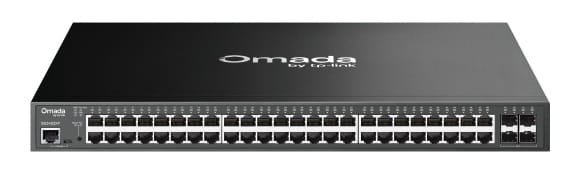
SG3452XP High Speed Switch
Experience a massive leap in performance: With 10Gbps SFP+ uplinks and high-capacity PoE+, this Omada backbone delivers speeds that make traditional Gigabit networks feel like they’re standing still.

Wireless: From Simple Passwords to Enterprise Identity

We’ve moved past the days when a sticker on the wall with a password was “security.”

Traditional Wi-Fi (Legacy)

Standards: 802.11n or early AC (Wi-Fi 4/5).
Security: Shared PSK (Pre-Shared Keys). If one employee leaves, everyone technically needs the password changed.
Congestion: High interference in the 2.4GHz and 5GHz bands with no “clean air” for critical tasks.

Modern Wireless (Wi-Fi 7 & Beyond)

Wi-Fi 7 (802.11be): Utilizing the 6GHz band, Wi-Fi 7 offers massive channels (320MHz) that feel like a wired connection.
Identity-Based Access: Moving to WPA3-Enterprise. By integrating with tools like Microsoft Intune or RADIUS, devices authenticate via certificates. If a laptop is lost, you revoke its certificate, and it’s instantly kicked off the network.
Automated Deployment: You don’t need to give staff a password anymore. Wi-Fi profiles can be pushed out via Microsoft Autopilot/Intune. The moment a staff member opens their new laptop, it securely connects to the “Enterprise” SSID using certificate-based authentication.
PPSK (Private PSK): For IoT devices that don’t support certificates, Omada allows unique passwords for every user on the same SSID, keeping guests and staff isolated.
The Lenovo ThinkPad P14s Gen 6 features Intel® Wi-Fi 7 BE201, supporting theoretical speeds up to 5.8 Gbps via 320MHz channels. In real-world environments, users can expect speeds between 1.5 Gbps and 3 Gbps when using a Wi-Fi 7 router and Windows 11.

Things to consider: Wireless vs Wired Networks

Wired Desk Phones vs. Softphones (Teams/3CX)

The Case for Wired: Physical IP phones are “set and forget.” They don’t rely on a PC’s CPU and provide dedicated QoS (Quality of Service) on the switch.
The Case for Apps: Using Teams or 3CX on a laptop over Wi-Fi 7 allows for “hot-desking.” With Omada’s Fast Roaming (802.11k/v/r), you can walk from the lobby to the boardroom mid-call without a drop.

Building Layout & Construction

The New Office Rule: If you are moving into a new office or doing a total refresh, Wi-Fi probably makes more sense than a massive cabling project. Modern Wi-Fi 7 is stable enough to handle 90% of office tasks. Save the expensive copper runs for the high-traffic areas.
The “Faraday Cage” Effect: If your building has thick concrete, foil-backed insulation, or heavy glass, Wi-Fi 7 – despite its power – will struggle. In these environments, wired backhauls to every room are non-negotiable.
When you need 10GE: If you have a local server or a creative team doing 4K video editing, you need a 10-Gigabit backbone (like the Omada SX3008F) to connect your main switch to your storage.
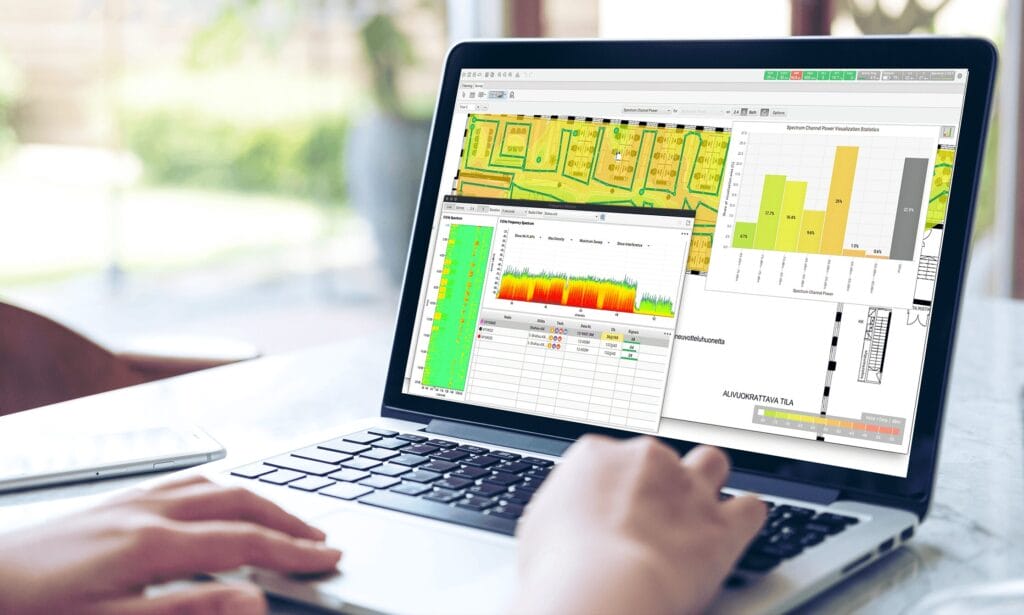
A digital site survey report showing heatmaps and signal analysis to optimize network hardware placement based on building construction.
TP-Link’s predictive survey tools map building layouts and physical barriers like concrete or glass to determine where Wi-Fi 7 will excel and where high-speed 10GE wired backhauls are required for optimal efficiency.

Security vs. RF Environment

RF Interference: In high-density urban areas, the airwaves are “noisy.” A wired connection is the only way to guarantee 100% uptime.
Physical Security: In high-security environments, you might disable Wi-Fi entirely or use MAC Filtering and 802.1x Port Security to ensure only authorised, physically plugged-in hardware can touch the server VLAN.

Which is right for you? Wired vs Wireless

Summary

For the modern office
The strategy is simple: Wire the infrastructure, Wireless the people. Build a rock-solid wired backbone using 2.5G and 10G Omada switches to feed your Access Points, then let Wi-Fi 7 handle the laptops, docks, and softphones. It’s cleaner, easier to manage via Intune, and much more flexible for a growing team. Wired and wireless network management is part of our ITaaS managed IT solution.

Whether you’re moving into a new space or your current Wi-Fi is showing its age, we can design a bespoke network blueprint for your business. Contact us today for a Wi-Fi 7 Site Survey or Network Consultation
Scroll to Top